Showing posts with label EV-SSL-Certificate. Show all posts

Wednesday, April 24, 2013

A Valuable Questions About EV SSL Certificate

Frequently Asked Questions about EV SSL Certificates answered by RapidSSLonline

What is an EV SSL Certificate Security?
EV SSL or Extended Validation SSL certificate is one of the most toughest and trusted SSL certificates, which is especially produced to protect wide level e-Business web servers and their users’ information, while it is being transferred between web browsers and servers.

What type of validation does an EV SSL certificate contain?
An EV SSL certificate issued  to any web organization contains complete Domain and Business Authentication details.

What are some major advantages Extended Validation SSL certificate has when compared to a Standard SSL?
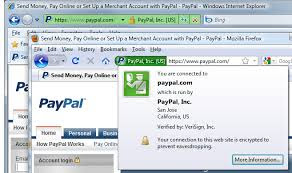
One of the greatest advantages of obtaining an EV SSL certificate is getting the green address bar status, which immediately alerts consumers that the site they are visiting offers the highest level of security.

Extended validation certificates offer online businesses the highest level of encryption, generally between 128-256 bit encryption. This ensures that all data transmissions are encrypted to the maximum, with virtually no chance of sensitive information falling into the hands of a third party.

Green EV SSL Address Bar

What is a Legal Opinion Letter of EV Certificate?
It is a professional opinion letter from Certified or Licensed Attorney for Extended Validation SSL certificate issuance. All major Certificate Authorities such as Symantec, GeoTrust, and Thawte require Legal Opinion Letter before EV issuance to any organization.

What encryption level does EV SSL contain?
EV has the toughest protection encryption such as 256 bit with 2048 bit CSR key generation.

How much time is needed for issuance of an EV SSL certificate?
It needs 10 to 15 business days for issuance of an EV SSL certificate.

What all web browsers are compatible with an Extended Validation SSL Certificate?
Here is the list of web browsers, which are the most compatible to EV cert.
  • Firefox 1+, 2+, 3+
  • IE 5+, 6+, 7+, 8+
  • Netscape 4+
  • Opera 7+
  • AOL 5+
  • Safari
list of ev ssl certificate browsers

How much warranty amount does an  EV SSL certificate contain?An EV SSL certificate contains  a minimum of $500,000 and maximum of $1,500,000 warranty.

Does EV security support mobile devices?Yes it does! Secure site pro with EV security from Symantec supports mobile devices, which is also the toughest security solution on the web.

What is the difference between EV SSL and WildCard SSL?
EV SSL certificate is a complete domain authentication which protects single qualified domain only on a single server and IP, whereas  WildCard SSL is domain authenticated security, which protects sub domains and as well as main domains on single server and IP.


Read more: http://www.hostreview.com/blog/130423-a-valuable-questions-about-ev-ssl-certificate#ixzz2RMTJX8M2

Thursday, September 6, 2012

Raise Green Sign of Trust & Decrease the Risk of Scam with EV SSL


An extended validation or EV SSL certificate lets a website’s visitors know that it is secure. The green color shown in the address bar, similar to the green color shown on a traffic light, indicates that the visitor can safely proceed when performing a monetary transaction. This type of certificate is the most advanced type of SSL certificate currently available, and a person who wishes to buy an EV SSL certificate needs to have credentials verified by a strict process.

Some browsers no longer show the traditional gold padlock to indicate that the information submitted on the page is secure. Instead, the green color in the address bar lets the user know that the site meets very strict security measures. The user can hover a mouse over the green color on the address bar to view information regarding the ownership of the website and the certification authority (CA).

The strict requirements of an EV SSL certificate mean that a hacker is going to find it extremely difficult to break into an account and steal sensitive information about the account holder. Numerous websites, including the professional sites of large corporations, do not use EV SSL certificates, and this fact is a troubling issue for many consumers.

Internet users want to see the green color in an address bar when they visit websites, even if the individuals do not use the sites for transactions involving money. Website owners who are negligent in the security measures they take to protect their customers and visitors are sure to lose valuable patronage from these individuals.

The risk of scam applies to any type of website. If the website owner purchases an affordable EV SSL certificate, the beneficial result is that the potential for customer growth increases.

Author Bio

Jim Armstrong is part of the expertly trained rapidSSLonline.com team. RapidSSLOnline is one of the most inexpensive SSL certificate providers in the world. RapidSSLOnline offers Wildcard SSL, EV SSL, SAN SSL, and Code Signing SSL certificates of major SSL brands such as VeriSign / Symantec, GeoTrust, Thawte, and RapidSSL on global scale.

Monday, June 6, 2011

Installing SSL on cPanel with CSR generation

cPanel is a Unix based web hosting control panel that provides a graphical interface and automation tools designed to simplify the process of hosting a web site. cPanel utilizes a 3 tier structure that provides functionality for administrators, resellers, and end-user website owners to control the various aspects of website and server administration through a standard web browser.

cPanel is commonly accessed on port 2082, with an SSL-secured server operating on port 2083.

Access through cPanel:
Generally cPanel customers will not have direct access to generate their own CSR (certificate signing request) and install an SSL. One may have to check with the hosting provider as to how to go about generating a CSR for certificates.

WHM (Web Hosting Manager):
The control center of the CPanel package is the WebHost Manager. Accounts can be set up and managed through WebHost Manager. Use WHM to generate your CSR and install your issued certificate.

To generate a CSR Certificate:
• Click on the “Generate an SSL certificate and Signing Request” link in the SSL/TLS menu.
• Enter the email address to send the certificate.
• Enter the domain that the SSL is being created for in the “Host to make cert. for” field.
• Fill in the other administration details of the certificate in the Country, State, City, Company Name, Company Division, and Email fields.
• Enter the password for the certificate in the Password field and click on “Create.”

On completion of these processes, an email will be sent to the address mentioned in the above steps with the download link to the certificate. Use the link to download the certificate, and afterward, perform the following steps.

Step 1: Certificates (CRT)

• Login to the Control Panel
• Click on SSL / TLS Manager
• Click “Generate, view, upload, or delete SSL certificates” option
• Paste the CSR supplied by the Certificate Authority in the “Certificate Signing Request (CSR)” section
• When the page loads, click the “Browse” button and locate the CRT file the SSL provider created. Or if you have highlighted and copied the contents of the CRT file, paste it in the “Upload a New Certificate” text box
• Click on the Upload button
• Click the “Go Back” link to return to SSL/TLS Manger

Step 2: Activate SSL on Your Web Site (HTTPS) (Perform this step prior to using the SSL Certificate)


• Click on SSL/TLS Manager > Setup a SSL certificate to work with your site. Contact your ISP, if this option is not available.
• From the Domain drop down menu select the domain that will use the SSL Certificate. The Cheap SSL Certificate and the corresponding private key will be fetched by the system.
• Open the Intermediate CA certificate in Notepad or another plain text editor and copy-and-paste all the contents of the intermediate file into the CA Bundle (CABUNDLE) box.
• Click on “Install Certificate.” If successful you should receive a message that the certificate was successfully installed.

Step 3: Verify Installation
To verify the installation correctly, use our SSL Certificate Checker

Once the SSL Certificate is installed correctly, the browser should display the essential lock pad beside the URL. High-end certificates such as an EV SSL Certificate will display the entire address bar in green.

About the Author:
RapidSSLonline is one of the largest cheap SSL certificate providers for VeriSign, GeoTrust SSL, Thawte and RapidSSL It provides 24/7 support for any question, anytime. For more information about RapidSSLonline please visit http://www.rapidsslonline.com